Date Published
July 02, 2024
Total Read
6 min
Tags
This quote by Sir Tim Berners-Lee, the inventor of the World Wide Web, is frequently cited in the accessibility community. It's a fitting way to begin this course, as it encapsulates the core principle of web accessibility.
Accessibility is indeed an essential aspect of the Web's universality. The Web is only truly accessible when everyone, regardless of disability, can use it. Without accessibility, the Web fails to be universal – it simply wouldn't fulfill its intended purpose!
On the Web, accessibility has a specific meaning. To design and develop accessible digital products, we must clearly define what makes a product accessible.
In this blog post, I'll explore the precise definition of web accessibility. This definition will guide every design and development decision you make as you strive to create more accessible websites and applications.
Grasping how accessibility differs from usability will help you understand why accessibility specialists often say that mere compliance isn't enough – true accessibility aims for usability.
Let's begin our journey into web accessibility!
In its broadest sense, "accessibility" refers to "the quality of being easily reached or entered." It encompasses the ability to access information or systems.
However, in the context of the Web, accessibility takes on a more specific meaning.
Web accessibility is the practice of designing websites and applications to be usable by people with disabilities. It focuses on removing barriers to access, and ensuring that digital content can be perceived, understood, navigated, and interacted with by individuals with various disabilities.
The concept of barriers extends beyond the digital realm. In the physical world, barriers to access might include:
Stairs and curbs without ramps (which deny access to people using wheelchairs)
Narrow sidewalks, doorways, or aisles
Small toilets and washing facilities without grab bars
Inaccessible furniture, such as high shelves and tables without leg space
Low lighting (which makes it hard for people who are deaf to communicate visually)
Weak colour contrast
Lack of automatic or push-button doors
By understanding these real-world parallels, we can better grasp the importance of removing digital barriers in web design and development. Just as we strive to make physical spaces accessible to everyone, we must apply the same principles to our digital environments.
Web accessibility isn't just about compliance with guidelines; it's about creating an inclusive digital world where everyone, regardless of their abilities, can participate fully and independently.
On the Web, several design and development practices can inadvertently create barriers for people with disabilities. These digital obstacles can take various forms, including:
Lack of visible keyboard focus indicators
Missing labels on form controls
Buttons, links, and UI elements that aren't keyboard-operable
Images without descriptive alternative (alt) text
Videos lacking captions, transcripts, or audio descriptions
Poor color contrast and small font sizes
Animations or motion effects that can't be paused or disabled
These barriers can significantly impede access to information and functionality for users with disabilities. Remember, web accessibility isn't just about compliance – it's about ensuring that all users, regardless of their abilities, can effectively interact with and benefit from your digital content.
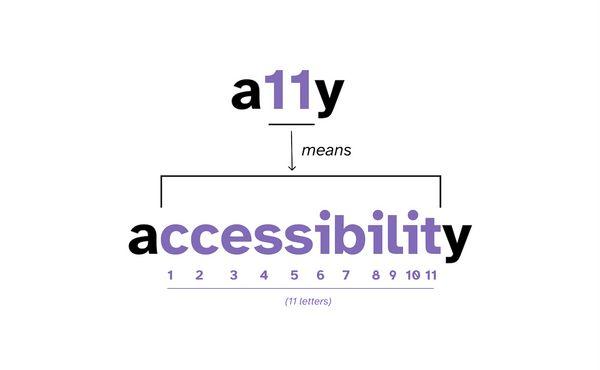
Accessibility is often referred to as “a11y” in the web community. If you’re new to accessibility, you may have come across this term already and you may have wondered what it means.
a11y(pronounced A-one-one-Y or A-eleven-Y) is a numeronym of the word “accessibility”.A numeronym is a word that uses numbers to shorten words.
The word accessibility is made of 13 letters. There’s 11 letters between the letter “a” and the letter “y”. So this term was created to shorten the word “accessibility” to “a11y”, with the 11 representing the 11 letters between “a” and “y”.
For many people new to the accessibility world, this term may be unfamiliar. So, like other acronyms or abbreviations, if you’re going to use this abbreviation, a good practice is to spell out the word “accessibility” in full the first time, and follow it with the numeronym that it represents:
The terms "accessibility" and "inclusivity" (or "inclusive web design") are often used interchangeably in the context of the web. However, they have distinct meanings and scopes.
Web accessibility design focuses on ensuring equal access for people with disabilities. Its primary goals are:
Removing barriers to access
Enabling people with disabilities to perceive, understand, navigate, and interact with websites and applications
Addressing issues specifically related to disability
Web accessibility design does not typically address broader issues beyond disability-related concerns.
Inclusive web design aims to accommodate a wide range of people from various:
Backgrounds and cultures
Ages
Abilities and disabilities
Genders
Geographical locations
Languages
Levels of computer literacy
Inclusive design attempts to address diverse issues to involve all users to the greatest extent possible—including people with disabilities. As such, inclusive design encompasses accessibility. A product isn't truly inclusive if it isn't accessible.
Internationalization: Targets users speaking different languages, regardless of disability.
Web performance optimization: Addresses the needs of people using low-end devices or slower internet connections, who may be located anywhere in the world and may or may not have disabilities.
Scope
- Inclusive designers proactively pursue the inclusion of everyone as much as possible, regardless of ability or disability.
- Accessibility designers focus primarily on the needs of people with disabilities.
Approach:
- A web accessibility designer ensures that a website is usable by people with disabilities, regardless of their assistive technology or input modality (e.g., screen readers, keyboards, braille displays, switch controls).
- An inclusive designer considers a broader range of user needs and experiences beyond disability-specific concerns.
Outcome:
- Accessibility design aims for equal task completion ability (e.g., a person using a screen reader or keyboard navigation should be able to perform the same tasks as someone without a disability).
- Inclusive design strives for a universally positive user experience across diverse user groups.
In conclusion, while accessibility is a crucial component of inclusive design, the latter encompasses a broader scope of user needs and experiences.
Inclusive design includes people with disabilities. So accessibility is a natural outcome of effective inclusive design.
And accessible design can alsobenefit people without disabilities, making products inclusive of more people.